Page

C# - Variables

A variable is nothing but a name given to a storage area that our programs can manipulate. Each variable in C# has a specific type, which determines the size and layout of the variable's memory the range of values that can be stored within that memory and the set of operations that can be applied to the variable.
The basic value types provided in C# can be categorized as −
TypeExample
Integral typessbyte, byte, short, ushort, int, uint, long, ulong, and char
Floating point typesfloat and double
Decimal typesdecimal
Boolean typestrue or false values, as assigned
Nullable typesNullable data types
C# also allows defining other value types of variable such as enum and reference types of variables such as class, which we will cover in subsequent chapters.

Defining Variables

Syntax for variable definition in C# is −
 ;
Here, data_type must be a valid C# data type including char, int, float, double, or any user-defined data type, and variable_list may consist of one or more identifier names separated by commas.
Some valid variable definitions are shown here −
int i, j, k;
char c, ch;
float f, salary;
double d;
You can initialize a variable at the time of definition as −
int i = 100;

Initializing Variables

Variables are initialized (assigned a value) with an equal sign followed by a constant expression. The general form of initialization is −
variable_name = value;
Variables can be initialized in their declaration. The initializer consists of an 
equal sign followed by a constant expression as −
  = value;
Some examples are −
int d = 3, f = 5;    /* initializing d and f. */
byte z = 22;         /* initializes z. */
double pi = 3.14159; /* declares an approximation of pi. */
char x = 'x';        /* the variable x has the value 'x'. */
It is a good programming practice to initialize variables properly, otherwise sometimes program may produce unexpected result.

Library Management Program in C#

class Program
    {
        static public int[] student = new int[100];
        static public int[] i = new int[5];
        static public int[] b = new int[5];
        static public int issuelimit = 2;
        static public string bookname;
        static public int id; 
        static public int bookcount;
        static public int bookid;
        static public int choice=0;
        static public char Repeat;

        static void Main(string[] args)
        {
            int choice=1;
            Console.WriteLine(" What do u want to do?\n");
            Console.WriteLine("1.Add a book to the Library");
            Console.WriteLine("2.Register a user ");
            Console.WriteLine("3.Issue a book");
            Console.WriteLine("4.Display list of Registered user");
            Console.WriteLine("5.Display list of books in library");
            Console.WriteLine("6.Exit");

            choice = Convert.ToInt16(Console.ReadLine());        

            LibMng lb = new LibMng();
            switch (choice)
            {
                case 1:
                    {   
                        do
                        {
                        Console.WriteLine("Enter the name of the book and the author's name: ");
                        string bookname = Convert.ToString(Console.ReadLine());
                        string author = Convert.ToString(Console.ReadLine());
                        bookcount++;
                        bookid++;
                            Console.WriteLine("\nDo you wish return more from the same card??(y/n)");
                                Repeat = Convert.ToChar(Console.ReadLine());
                        } 
                            while (Repeat == 'y' || Repeat == 'Y');
                            break;                      
                    }
                case 2:
                    {
                        Console.WriteLine("Enter the name and address of user: ");
                        string studentname = Convert.ToString(Console.ReadLine());
                        string studentadd = Convert.ToString(Console.ReadLine());
                        Console.WriteLine("Enter the card ID");
                        id = Convert.ToInt16(Console.ReadLine());
                            do
                            {
                                if (student[id] != 0)
                                {
                                    lb.bookReturn();
                                }
                                else
                                {
                                    Console.WriteLine("Till no book is issued to this card");
                                    break;
                                }
                                Console.WriteLine("\nDo you wish return more from the same card??(y/n)");
                                Repeat = Convert.ToChar(Console.ReadLine());
                            } 
                            while (Repeat == 'y' || Repeat == 'Y');
                            break;                      
                    }
                case 3:
                    {
                        Console.WriteLine("Enter the Student id");
                        id = Convert.ToInt16(Console.ReadLine());
                        do
                        {
                            if (student[id] < 2)
                            {
                                lb.Issue();
                            }
                            else
                            {
                                Console.WriteLine("Sorry no more books can be issued");
                                break;
                            }

                            Console.WriteLine("\nDo you wish to issue more to the same card??(y/n)");
                            Repeat = Convert.ToChar(Console.ReadLine());
                        }
                        while (Repeat == 'y' || Repeat == 'Y');
                        break;
                    }
                case 4:
                    {
                    do
                                {
                                    Console.WriteLine("the list of registered student is:");
                                    foreach (int a in Student)
                                    {
                                        Console.WriteLine("Name: ", a.studentname);
                                        Console.WriteLine("StudentId: {0}", a.studentid);
                                        Console.WriteLine("Number of books issued: {0}", a.NoOfBooksIssues);
                                    }
                                    Console.WriteLine("do you wish to continue??(y/n)");

                                } while (Repeat == 'y' || Repeat == 'Y');
                        break;
                    }
                case 5:
                    {
                                do
                                {
                                    Console.WriteLine("the list of books in library:");
                                    foreach (int b in BookLibrary)
                                    {
                                        Console.WriteLine("Book Title: {0}", b.bookname);
                                        Console.WriteLine("Book Id: {0}", b.bookid);
                                        Console.WriteLine("Author name: {0}", b.author);
                                    }
                                    Console.WriteLine("do you wish to continue??(y/n)");

                                } while (Repeat == 'y' || Repeat == 'Y');
                        break;
                    }                
                case 6:
                    {
                        break;
                    }

            }
                    Console.ReadLine();
            }
        }
        class LibMng : Program
        {
            public void Issue()
            {                
                Console.WriteLine("Enter The Book id ");
                int reqbook = Convert.ToInt32(Console.ReadLine());
                if (reqbook == bookid)
                {
                    if (i[0] != 0)
                    {
                        i[0]--;
                        Console.WriteLine("The Book is issued to Card{0}", id);
                        student[id]++;
                    }
                    else
                        Console.WriteLine("Book is not available");
                }
            }
            public void display()
            {
                Console.WriteLine("the books taken are: ");
            }

            public void chckAvail()
            {
                Console.WriteLine("Enter The Book id");
                int req = Convert.ToInt32(Console.ReadLine());
                if (req == bookid)
                {
                    if (i[0] != 0)
                    {
                        Console.WriteLine("The number of copy of the Book is::{0}", i[0]);
                    }
                    else
                        Console.WriteLine("Book is not available");
                }
            }
        }

            class BookLibrary: Program
            {
                public int bookcount;
                public int bookid;
                public string bookname;
                public string booktitle;

                public BookLibrary(int bookcount, int bookid, string bookname, string booktitle)
                {
                    this.bookcount = bookcount;
                    this.bookid = bookid;
                    this.bookname = bookname;
                    this.booktitle = booktitle;
                }               

            }
            class Student
            {
                public int studentcount;
                public int studentid;
                public string studentname;
                public int noOfbookissues = 0;

                public Student(int studentcount, int studentid, string studentname, int noOfbooksissued)
                {
                    this.studentcount = studentcount;
                    this.studentid = studentid;
                    this.studentname = studentname;
                    this.noOfbookissues = noOfbookissues;
                }
            }
            class IssueReturn: Program
            {            
                public void bookReturn()
                {
                Console.WriteLine("Enter The Book ID");
                int req1 = Convert.ToInt32(Console.ReadLine());

                if (req1==bookid)
                {
                    if (i[0] != 1)
                    {
                    i[0]++;
                    Console.WriteLine("The Book is returned from Card {0}", id);
                    student[id]--;
                    }
                else
                    Console.WriteLine("Till the Book is not issued to this Card");
                }
                }
            }
        }
    }

How to SUM two fields within an SQL query

                                                          Value1     Value2
                                                         -----------------------
                                                             3               6
                                                             1               5
                                                             4               3
                                                             8               1

SQL Query :

select Value1 + Value2 as qty  from Table1;

Result :

                                                               qty
                                                            ---------
                                                                9
                                                                6
                                                                7
                                                                9

How to Convert Amount (Currency) in words directly on Crystal Report.


To Create function follow the steps given below:
(i) go to Field Explorer
(ii) right click on Formula Fields click on New give specific name
(iii) Formula Editor window will open just paste the Code given below
(iv) Save & Close...
(v) Just drag the Field to your specific required Location that done...

Changes to be made from your side is
i) AmntTypes.UnitCost : This is a Database Field. Change as per your requirement.

Please note if you have Currency as Datatype in SQL DB than Do use ToNumber() function to convert it to number otherwise it will throw error of Number Required.

numbervar RmVal:=0;
currencyVar Amt:=0;
numbervar pAmt:=0;
stringvar InWords :="Rupees ";

Amt := ({AmntTypes.UnitCost});

if Amt > 10000000 then RmVal := truncate(ToNumber(Amt)/10000000);
if Amt = 10000000 then RmVal := 1;
if RmVal = 1 then
InWords := InWords + " " + towords(RmVal,0) + " crore"
else
if RmVal > 1 then InWords := InWords + " " + towords(RmVal,0) + " crores";

Amt := Amt - Rmval * 10000000;
if Amt > 100000 then RmVal := truncate(ToNumber(Amt)/100000);
if Amt = 100000 then RmVal := 1;
if RmVal >=1 then
InWords := InWords + " " + towords(RmVal,0) + " lakhs";

Amt := Amt - Rmval * 100000;
if Amt > 0 then InWords := InWords + " " + towords(truncate(Amt),0);
pAmt := (ToNumber(Amt) - truncate(ToNumber(Amt))) * 100;
if pAmt > 0 then
InWords := InWords + " and " + towords(pAmt,0) + " paisa only"
else
InWords := InWords + " only";
UPPERCASE(InWords)


How to Build a New Database in Access

Step 1. Create a blank database. First, launch Access and choose File> New.


Step 2. Add a database name. then press create.


Step 3. Right Click on Table.and select Design View and set the table name.


Step 4. Add Column name and set the DataType 


Step 5. Click Save


Messagebox with Yes No button c#

private void btnclose_Click(object sender, EventArgs e)
        {
            string message = "Do you want to close this window?";
            string title = "Tools Management System";
            MessageBoxButtons buttons = MessageBoxButtons.YesNo;

            DialogResult result = MessageBox.Show(message, title, buttons);
            if (result == DialogResult.Yes)
            {
                this.Dispose();
            }
            else
            {
                // Do something
            }
        }


How To Send Email From C# Windows Application Using Gmail SMTP

 private void btnSend_Click(object sender, EventArgs e)
        {
            try
            {
                MailMessage message = new MailMessage();
                SmtpClient smtp = new SmtpClient();

                message.From = new MailAddress("abc@gmail.com");
                message.To.Add(new MailAddress("xyz@gmail.com"));
                message.Subject = "Test";
                message.Body = "Content";

                smtp.Port = 587;
                smtp.Host = "smtp.gmail.com";
                smtp.EnableSsl = true;
                smtp.UseDefaultCredentials = false;
                smtp.Credentials = new NetworkCredential("abc@gmail.com", "**********");
                smtp.DeliveryMethod = SmtpDeliveryMethod.Network;
                smtp.Send(message);
            }
            catch (Exception ex)
            {
                MessageBox.Show("err: " + ex.Message);
            }
}

How to get Hidden Column Value in GridView

Try to have them Visible="true", but hide them with CSS.

METHOD 1:

<style type="text/css">
 .hidden-col
 {
     display:none;
 }
</style>


<asp:BoundField HeaderText="User ID" DataField="Id" ItemStyle-CssClass="hidden-col" HeaderStyle-CssClass="hidden-col" >

</asp:BoundField>


METHOD 2:

<asp:BoundField HeaderText="User ID" DataField="Id"  Visible="False" >

</asp:BoundField>

Interview Questions in ASP.NET,C#.NET,SQL Server.

1.Describe state management in ASP.NET.
State management is a technique to manage a state of an object on different request.
The HTTP protocol is the fundamental protocol of the World Wide Web. HTTP is a stateless protocol means every request is from new user with respect to web server. HTTP protocol does not provide you with any method of determining whether any two requests are made by the same person.
Maintaining state is important in any web application. There are two types of state management system in ASP.NET.
1. Client-side state management
2. Server-side state management

2.Explain client side state management system.
ASP.NET provides several techniques for storing state information on the client. These include the following:
View state ASP.NET uses view state to track values in controls between page requests. It works within the page only. You cannot use view state value in next page.

Control state: You can persist information about a control that is not part of the view state. If view state is disabled for a control or the page, the control state will still work.

Hidden fields: It stores data without displaying that control and data to the user’s browser. This data is presented back to the server and is available when the form is processed. Hidden fields data is available within the page only (page-scoped data).

Cookies:Cookies are small piece of information that server creates on the browser. Cookies store a value in the user’s browser that the browser sends with every page request to the web server.


Query strings: In query strings, values are stored at the end of the URL. These values are visible to the user through his or her browser’s address bar. Query strings are not secure. You should not send secret information through the query string.

3.Explain server side state management system.
The following objects are used to store the information on the server:
Application State:This object stores the data that is accessible to all pages in a given Web application. The Application object contains global variables for your ASP.NET application.

Cache Object: Caching is the process of storing data that is used frequently by the user. Caching increases your application’s performance, scalability, and availability. You can catch the data on the server or client.


Session State: Session object stores user-specific data between individual requests. This object is same as application object but it stores the data about particular user.

4.Explain cookies with example.
A cookie is a small amount of data that server creates on the client. When a web server creates a cookie, an additional HTTP header is sent to the browser when a page is served to the browser. The HTTP header looks like this:

Set-Cookie: message=Hello. After a cookie has been created on a browser, whenever the browser requests a page from the same application in the future, the browser sends a header that looks like this:

Cookie: message=Hello

Cookie is little bit of text information. You can store only string values when using a cookie. There are two types of cookies:

Session cookies 
Persistent cookies

A session cookie exists only in memory. If a user closes the web browser, the session cookie delete permanently.

A persistent cookie, on the other hand, can available for months or even years. When you create a persistent cookie, the cookie is stored permanently by the user’s browser on the user’s computer.

Creating cookie
protected void btnAdd_Click(object sender, EventArgs e) 
{
    Response.Cookies[“message”].Value = txtMsgCookie.Text; 
}
// Here txtMsgCookie is the ID of TextBox. 
// cookie names are case sensitive. Cookie named message is different from setting a cookie named Message.

The above example creates a session cookie. The cookie disappears when you close your web browser. If you want to create a persistent cookie, then you need to specify an expiration date for the cookie.

Response.Cookies[“message”].Expires = DateTime.Now.AddYears(1);
Reading Cookies
void Page_Load() 
{
if (Request.Cookies[“message”] != null) 
lblCookieValue.Text = Request.Cookies[“message”].Value; 
}

// Here lblCookieValue is the ID of Label Control.

5.Describe the disadvantage of cookies.
Cookie can store only string value.
Cookies are browser dependent.
Cookies are not secure.

Cookies can store small amount of data.

6.What is Session object? Describe in detail.

HTTP is a stateless protocol; it can't hold the user information on web page. If user inserts some information, and move to the next page, that data will be lost and user would not able to retrieve the information. For accessing that information we have to store information. Session provides that facility to store information on server memory. It can support any type of object to store. For every user Session data store separately means session is user specific.


7.What are the Advantages and Disadvantages of Session?
Following are the basic advantages and disadvantages of using session.

Advantages:
It stores user states and data to all over the application.
Easy mechanism to implement and we can store any kind of object.
Stores every user data separately.
Session is secure and transparent from user because session object is stored on the server.

Disadvantages:
Performance overhead in case of large number of user, because of session data stored in server memory.
Overhead involved in serializing and De-Serializing session Data. Because In case of StateServer and SQLServer session mode we need to serialize the object before store.

8.Describe the Master Page.
Master pages in ASP.NET works as a template that you can reference this page in all other content pages. Master pages enable you to define the look and feel of all the pages in your site in a single location. If you have done changes in master page, then the changes will reflect in all the web pages that reference master pages. When users request the content pages, they merge with the master page to produce output that combines the layout of the master page with the content from the content page.


ContentPlaceHolder control is available only on master page. You can use more than one ContentPlaceHolder control in master page. 

9. What are the various types of validation controls provided by ASP.NET?
ASP.NET provides 6 types of validation controls as listed below:

i.) RequiredFieldValidator - It is used when you do not want the container to be empty. It checks if the control has any value or not. 

ii.) RangeValidator - It checks if the value in validated control is within the specified range or not. 

iii.) CompareValidator - Checks if the value in controls matches some specific values or not. 

iv.) RegularExpressionValidator - Checks if the value matches a specific regular expression or not.

v.) CustomValidator - Used to define User Defined validation.

vi.) Validation Summary - Displays summary of all current validation errors on an ASP.NET page.


10. What are the various types of Authentication?
There are 3 types of Authentication namely Windows, Forms and Passport Authentication.

Windows authentication - It uses the security features integrated in Windows NT and Windows XP OS to authenticate and authorize Web application users.

Forms authentication - It allows you to create your own list of users and validate their identity when they visit the Web site.

Passport authentication - It uses the Microsoft centralized authentication provider to identify users. Passport allows users to use a single identity across multiple Web applications. Passport SDK needs to be installed to use Passport authentication in your Web application.

11. Explain Server-side scripting and Client-side scripting.

Server side scripting - All the script are executed by the server and interpreted as needed. 

Client side scripting means that the script will be executed immediately in the browser such as form field validation, email validation, etc. It is usaullaycarrried out in VBScript or JavaScript.

12. What is garbage collection?
It is a system where a run-time component takes responsibility for managing the lifetime of objects and the heap memory that they occupy.

13. Explain the steps to be followed to use Passport authentication.
1. Install the Passport SDK. 
2. Set the application’s authentication mode to Passport in Web.config. 
3. Set authorization to deny unauthenticated users.
3. Use the PassportAuthentication_OnAuthenticate event to access the user’s Passport profile to identify and authorize the user.
4. Implement a sign-out procedure to remove Passport cookies from the user’s machine.


14. Explain the advantages of ASP.NET.
Following are the advantages of ASP.NET.

1.Web application exists in compiled form on the server so the execution speed is faster as compared to the interpreted scripts.

2.ASP.NET makes development simpler and easier to maintain with an event-driven, server-side programming model.

3.Being part of .Framework, it has access to all the features of .Net Framework.

4.Content and program logic are separated which reduces the inconveniences of program maintenance.

5.ASP.NET makes for easy deployment. There is no need to register components because the configuration information is built-in.

6.To develop program logic, a developer can choose to write their code in more than 25 .Net languages including VB.Net, C#, JScript.Net etc.

7.Introduction of view state helps in maintaining state of the controls automatically between the postbacks events.

8.ASP.NET offers built-in security features through windows authentication or other authentication methods.

9.Integrated with ADO.NET.

15. What are the Web Form Events available in ASP.NET?
1. Page_Init
2. Page_Load
3. Page_PreRender
4. Page_Unload
5. Page_Disposed
6. Page_Error
7. Page_AbortTransaction
8. Page_CommitTransaction
9. Page_DataBinding


How to Create Maintenance Backup Plan in SQL Server 2008 R2 Using The Wizard

Check SQL Server Agent service

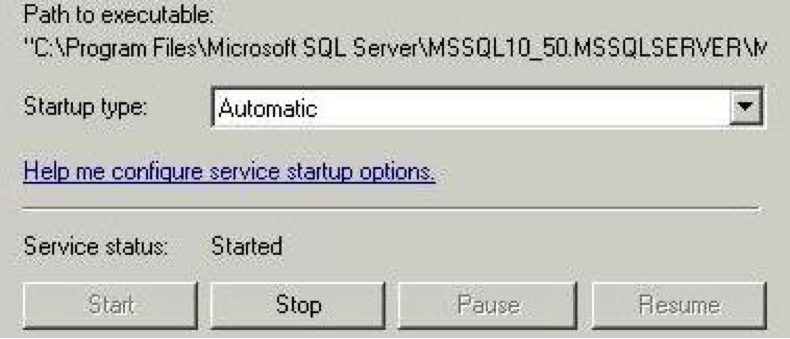
Verify that the SQL Server Agent service is running and set to automatic. The maintenance plan depends on this service to run.

1.On the server, open the Run dialog box, type in services.msc and press Enter. 


2.Find the SQL Server Agent service in the list and double-click it. 


3.Cick the Recovery tab, and set the failure value to Restart the Service.
4.On the General tab, select Automatic as the startup type, and then start the service. 


Create the maintenance plan

1.Launch the SQL Management Studio and log in.
2.In the Object Explorer pane, go to Management > Maintenance Plans, right-click Maintenance Plans, and select Maintenance Plan Wizard. 


3.On the welcome page of the wizard, click  Next.
4.On the Select Plan Properties page, specify a name for the plan, select  Separate schedules for each task, and then click Next.
5.On the Select Maintenance Tasks page, select the Back Up Database (Full),  Back Up Database (Differential), and Back Up Database (Transaction Log) check boxes, and then click Next.


6.On the Select Maintenance Task Order page, leave the order as shown, and then click Next.

Define full backup settings

On the Define Back Up Database (Full) Task page, set up the full backup  according to the following instructions.

1.Select the databases that you want to back up (typically All user databases).
2.Specify when you want the backups to expire. In the following example, 14 days is specified. 
   Note: This setting overwrites the oldest backup file for rotation.
3.Select your backup media (typically Disk).
4.Specify a location (either Default or as assigned by you) for your backup files.
5.Select the Verify backup integrity check box.
6.To configure the scheduling options for this task, click Change near the bottom of the page.


7.In the Job Schedule Properties dialog box, select Recurring for the Schedule type.
8.Specify the frequency of the backup. The following example shows full backups running on        Monday, Wednesday, and Friday. Alter this to fit your backup plan.
9.Adjust the daily frequency according to when your backup needs to run.
10.Under Duration, adjust the Start and End dates. In the example No end date is selected.


11.Click OK.
12.On the Define Back Up Database (Full) Task page of the Maintenance Plan Wizard, click Next.

Define differential Backup Settings

On the Define Back Up Database (Differential) Task page, set up the differential backup according to the following instructions. The settings are similar to the settings for the full backup.

1.Select the databases that you want to back up (typically All user databases).
2.Specify when you want the backups to expire.
3.Select your backup media (typically Disk).
4.Specify a location (either Default or as assigned by you) for your backup files.
5.Select the Verify backup integrity check box.
6.To configure the scheduling options for this task, click Change near the bottom of the page.
7.In the Job Schedule Properties dialog box, select Recurring for the schedule type.
8.Specify the frequency of the backup. For example, you could choose to run differential backups on Tuesday, Thursday, Saturday, and Sunday.
9.Under Duration, adjust the daily frequency according to when your backup needs to run.
10.Adjust the Start and End dates.
11.Click OK.
12.On the Define Back Up Database (Differential) Task page of the Maintenance Plan Wizard, click Next.

Define transaction log backup settings

On the Define Back Up Database (Transaction Log) Task page, set up the transaction log backup according to the following instructions.

1.Select the databases that you want to back up (typically All user databases).
2.Do not select the Backup set will expire check box. 
Expiration of transaction log backups is configured in the next section, “Set up the transaction log cleanup task."
3.Select your backup media (typically Disk).
4.Specify a location (either Default or as assigned by you) for your backup files.
5.Copy the path for the backup file and paste it to Notepad. You will need to refer to this path in later steps.
6.Select the Verify backup integrity check box.
7.To configure the scheduling options for this task, click Change near the bottom of the page. 
Note : You need to determine transaction log backup intervals based on transaction log growth. It might be necessary to run the transaction log backups at  shorter intervals to prevent transaction logs from growing.
8.In the Job Schedule Properties dialog box, select  Recurring for the Schedule type.
9.Specify the frequency of the backup. In the following example, the transaction log backups are running daily.
10.Adjust the daily frequency. In the following example, this is set to run every hour.
11.Under Duration, adjust the Start date and End date fields. 


12.Click OK.
13.On the Define Back Up Database (Transaction Log) Task page of the Maintenance Plan Wizard, click Next.
14.On the Select Report Options page, specify how you want to save the details of the maintenance plan, and then click Next.
15.On the Complete the Wizard page, click Finish.
16.On the Maintenance Plan Wizard Progress page, click Close.
17.When you are returned to the SQL Server Management Studio main window, press F5 to refresh the maintenance plan with the new settings.
The new maintenance plan is listed under Maintenance Plans in the Object Explorer pane.

Set up the transaction Log Cleanup Task

This section demonstrates how to set up a maintenance cleanup task. This task is set to clean up the transaction logs after three days. This setting keeps the one-hour transaction logs for three days, until the maintenance cleanup task deletes the old data. The transaction log cleanup must include a series of three days, which ensures that if you need to revert back to the second differential backup, you can apply the transaction logs from that time period. The goal is to have enough transaction log backups between the full and differential backups.

1.Click the maintenance plan name.
2.In the Design pane, select the Subplan_3.
3.In the Toolbox pane, select Maintenance Cleanup Task and drag it into the transaction log backup area under the Design pane.
4.Right-click on the Maintenance Cleanup Task and choose Edit. 


5.In the Maintenance Cleanup Task dialog box, select Backup files.
6.Select Search folder and delete files based on an extension.
7.In the Folder text box, enter the path that you pasted into Notepad in the previous task. Ensure that you include the same path that your transaction logs are backing up to.
8.Enter the file extension type, trn.  Do not precede the extension with a period.
9.Select the Include the first-level sub-folders check box.
10.Select the Delete files based on the age of the file at task run time check box, and set the file age to 3 Days.


11.Click OK to return to the Management Studio main window.
12.Drag the green arrow from the differential backup task to the maintenance cleanup task.
13.Double-click the connected green line. 


14.In the Precedence Constraint Editor, set Value to Completion. 

This setting allows the task to become conditional, meaning that if the differential backup did not run, then the transaction cleanup task is not run, or if the backup did run, the cleanup task is run.


15.Click OK to return to the Management Studio main window.
The line should now appear blue. 


16.Save your work by selecting Save All from the File menu.
You have finished setting up your maintenance backup plan. You can adjust your backup plan to your needs, but you should first test it.

Test your setup

After you are done setting up your maintenance plan, verify that it works. You can wait a few days to see if the job completes, or you can force the job to run by performing the following steps.

1.In the Object Explorer pane of SQL Server Management Studio, browse to SQL Server Agent > Jobs.
2.Right-click the maintenance plan and select Start Job at Step. 
This command runs the first section of the maintenance plan.
3.If the job completes without error, run the next step of the maintenance plan and test-run the setup. Repeat this step for all subplans that you created in the maintenance plan.
If all of your steps run without error, your maintenance plan works and you are finished.

Troubleshoot errors by viewing the job history

If any of the jobs fail when testing the maintenance plan, view the job history to see what failed.

1.In the Object Explorer pane, right-click the failed subplan and select View History.
The Log File Viewer window, which shows the job history, is displayed. 


If the job failed  a red X icon is displayed next to the time that you ran the job.

2.Click the row for the failed job.
Details about the error appear below the table. Scroll or expand the pane to see more information.


3.Troubleshoot the error and repeat the test-job.

When your maintenance plan is reliable, check it in a few days to see if it is running as expected. Verify that the .bak files are being removed after the expiration and that the transaction logs are being cleaned up after three days.